
Bhai aur behen, agar aap AI video generation ke world mein ho toh last kuch mahine se bahut saare names sun rahe honge – Sora, Veo, Kling aur ab Seedance 2.0. Main toh personally bahut excited hoon iske baare mein kyunki ye sirf ek naya tool nahi hai, balki creators ke liye game changer hai. Aaj is article mein main aapko full detail mein bataunga ki Seedance 2.0 kya hai, iske features kaise kaam karte hain, aur sabse important – ye OpenAI ke Sora aur Google ke Veo 3 se kaise alag hai. Article lambi hai (1500+ words), step-by-step, real examples ke saath, taaki aap padh ke samajh jaao aur decide kar sako ki aapke workflow ke liye kaunsa best hai. Chalo shuru karte hain!
Pehle Samjhte Hain Seedance 2.0 Kya Hai?
Seedance 2.0 ByteDance ka latest AI video generation model hai – haan, wahi company jo TikTok banati hai. February 2026 mein launch hua tha aur isne pura AI video space hila diya. Simple words mein bolun toh ye ek multi-modal AI video creator hai jo sirf text prompt se nahi, balki images, videos aur audio files ko combine karke cinematic quality ke videos banata hai.
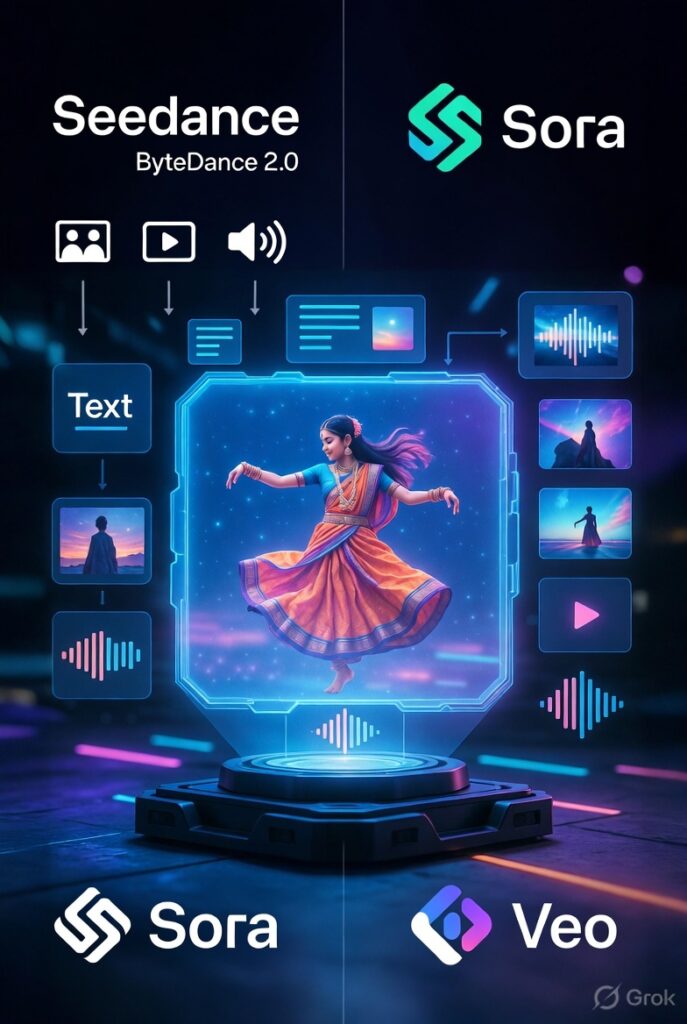
Pehle wale models (jaise Seedance 1.5) mein sirf text ya single image se video banta tha, lekin 2.0 mein ye unified multimodal audio-video joint generation architecture use karta hai. Matlab aap ek saath text prompt + 9 images + 3 videos (total 15 seconds tak) + 3 audio files (MP3, total 15 seconds tak) daal sakte ho – maximum 12 files! Ye sab ek hi generation mein process hota hai.
Anúncios
Key point: Ye sirf video nahi banata, balki native audio bhi generate karta hai. Sound effects, background music, dialogue – sab synced hota hai. Aur haan, multi-shot storytelling bhi support karta hai, jaise ek proper short film ka scene. Duration 4 se 15 seconds tak flexible hai, resolution 720p ya 1080p tak, aur aspect ratio 9:16 (Reels ke liye perfect), 16:9, 1:1 sab kuch.
Mere hisaab se ye model specially Indian creators ke liye bana hai kyunki CapCut (ByteDance ka hi app) mein directly integrate ho gaya hai. Dreamina aur kuch third-party platforms jaise Higgsfield, fal.ai pe bhi available hai. Free trial bhi milta hai, lekin pro plans se full power unlock hoti hai.
Seedance 2.0 Ke Major Features – Kya Kya Kar Sakta Hai Ye?
Ab detail mein jaate hain features pe, kyunki ye hi isko special banata hai:
- Multimodal Reference System with @ Tagging
Ye sabse bada USP hai. Aap reference files upload karo aur prompt mein @Image1, @Video2, @Audio3 jaise tags use karke batao ki kya kya use karna hai. Example: “@Image1 ko main character banao, @Video1 ki dance move copy karo, camera @Video2 jaisa dolly zoom karo aur @Audio1 ke beat pe sync karo.”
Motion, choreography, camera movement, lighting, character consistency – sab copy ho jaata hai bina extra prompt likhe. Pehle wale models mein aapko har cheez describe karni padti thi, yahan reference khud bol deta hai. - Character aur Scene Consistency
Faces, clothes, background – sab across multiple shots stable rehta hai. Koi morphing ya flickering nahi. Complex interactions jaise figure skating, fight scenes, ya product demo mein bhi physics realistic lagta hai. - Native Audio-Video Joint Generation
Video ke saath audio bhi generate hota hai. Lip-sync multiple languages mein (English, Hindi, Chinese, etc.). Aap apna music upload karo toh beat-sync ho jaata hai. Sound effects automatically add ho jaate hain jaise footsteps, wind, etc. Ye bahut badi baat hai kyunki pehle alag se audio add karna padta tha. - Video Extension aur Editing
Existing video upload karke extend kar sakte ho, characters replace kar sakte ho, elements add/remove kar sakte ho. Matlab pura post-production AI handle kar deta hai. 15 seconds ka clip banaya toh usko 30 seconds tak badha sakte ho seamlessly. - Director-Level Control
Camera movements (pan, zoom, tracking shot), lighting, shadows, performance – sab control mein. Multi-shot storyboarding bhi built-in hai, jaise ek hi prompt se 3-4 cuts wala scene ban jaaye.
Real life example: Maan lo aap ek Reels bana rahe ho jisme ek girl traditional Indian dress mein dance kar rahi hai. Aap ek reference photo daal do style ke liye, ek short dance video motion ke liye, aur gaana audio ke liye. Prompt likho “@photo1 wali ladki ko @video1 ki moves do, background Diwali lights wala banao aur @audio1 ke lyrics pe lip-sync karo.” – 10 seconds mein ready cinematic video!
Ab Asli Sawal: Seedance 2.0 Sora Aur Veo 3 Se Kaise Alag Hai?
Yahan comparison karte hain properly. Main ne real tests aur reviews se data liya hai (2026 ke latest comparisons se). Koi hype nahi, sirf facts.
Sora (OpenAI ka Sora 2)
Sora bahut strong hai prompt understanding mein. Aap sirf detailed text likho, wo creative aur stylized videos bana deta hai. Physics accuracy bhi top class hai – gravity, collisions, fluid movements sab natural. Temporal consistency bahut achhi, objects morph nahi hote. Native audio bhi generate karta hai (dialogue, foley, music).
Lekin differences:
- Inputs: Sirf text + 1 image. Koi multi-video ya audio reference nahi. Aap reference copy nahi kar sakte.
- Duration: Max 12 seconds (fixed tiers). Seedance ka 15s flexible hai.
- Control: Storyboard mode hai lekin Seedance jaisa @ tagging aur motion replication nahi.
- Speed aur Cost: Slower generation aur mehnga (approx $1 per 10s clip). Seedance sasta aur faster.
- Best for: Creative storytelling, product demos jahan physics important ho. Lekin agar aapko exact reference chahiye toh struggle.
Mere khayal se Sora “idea se video” ke liye best hai jab aapko zero reference ho, lekin practical control mein Seedance aage hai.
Veo 3 (Google ka Veo 3 / 3.1)
Veo cinematic quality ka king hai. Lighting, depth of field, color grading, textures – sab broadcast level ke. 24fps true cinema feel deta hai. Photorealism bahut high. Native audio bhi strong (ambient, dialogue). Google ecosystem ke saath integrate hota hai.
Lekin yahan bhi differences clear hain:
- Inputs: Text + 1-2 images max. Koi video/audio references nahi. Aap motion copy nahi kar sakte.
- Duration: Sirf 8 seconds max (bahut short). Seedance double se zyada.
- Control: Limited. Two-frame steering hai lekin Seedance jaisa full multimodal nahi.
- Cost: Sabse mehnga ($2.5+ per clip with audio). Generation time bhi longer (2-3 minutes).
- Best for: High-end commercials, film-like shorts. Lekin short-form content (Reels, YouTube Shorts) ke liye length aur speed ki kami feel hoti hai.
Seedance 2.0 yahan jeet jaata hai kyunki ye control + speed + value ka perfect mix hai. Veo polish deta hai lekin Seedance aapko director banata hai – aap bolte ho “ye waisa banao” aur wo exact waisa ban jaata hai references se.
Quick Table Summary (mere hisaab se):
- Control & References: Seedance >>> Sora > Veo
- Physics & Realism: Sora ≈ Seedance > Veo
- Cinematic Polish: Veo > Seedance > Sora
- Audio Sync: Seedance aur Veo dono strong, Sora bhi achha lekin inputs nahi
- Length & Flexibility: Seedance > Sora > Veo
- Price & Speed: Seedance sabse best value
- Ease for Beginners: Sora (text only) > Seedance (thoda learning curve @ tags ka) > Veo
Kaun Si Situations Mein Seedance 2.0 Best Hai?
- Short-form social content (Reels, Shorts, TikTok) – motion aur consistency ki wajah se
- Music videos aur dance reels – audio sync king
- Marketing ads – template replication aur editing
- Indian creators – CapCut integration + Hindi lip-sync
- Budget creators – sasta aur powerful
Limitations bhi hain: Real human faces reference mein nahi daal sakte (virtual portraits use karne padte hain privacy ke liye). Learning curve hai @ tagging samajhne mein. Aur kuch countries mein availability limited hai (US, Japan mein thoda issue).
Final Thoughts – Aapko Kaunsa Choose Karna Chahiye?
Dosto, Seedance 2.0 Sora aur Veo 3 se fundamentally alag hai kyunki ye “control” pe focus karta hai. Sora imagination ko power deta hai, Veo polish deta hai, lekin Seedance aapko asli director banata hai – references, editing, audio sync sab ek jagah. ByteDance ne practically soch ke banaya hai, isliye creators jo roz content banate hain unke liye ye sabse useful lagta hai.
Agar aap beginner ho aur sirf idea se video chahiye toh Sora try karo. Professional cinematic feel chahiye toh Veo. Lekin agar aapko power, speed, aur exact control chahiye – Seedance 2.0 le lo. Main personally abhi mostly Seedance use kar raha hoon apne Reels ke liye kyunki time bach jaata hai aur output pro level ka hota hai.
Agar aap bhi try karna chahte ho toh seed.bytedance.com ya CapCut app check karo. Free credits mil jaate hain. Kya aapne already try kiya hai? Comment mein batao ki aapka experience kaisa raha. Aur haan, agar ye article helpful laga toh share kar dena friends ke saath jo AI video mein interested hain.
Ye tha pura detail Seedance 2.0 pe. Ab aap batao – next kaunsa model try karna hai? Sora 3 wait kar rahe ho ya Seedance hi final hai? Keep creating, keep learning! 🚀

